Monday, June 11, 2007

Cache

The cache is where your web browsers stores parts of websites you visit online. The goal is to speed up your web browsing experience by keeping parts of the website stored on your computer in the "cache" as opposed to downloading them again. These means that pages you visit regularly are loaded quicker. Internet Explorer users will know the cache as "Temporary Internet Files."

[red][b]What Files Are Stored in the Cache? [/b][/red]
All types of files related to the websites you visit are stores in the cache. These include image files like JPEG or GIF files. The actual web page HTML file can also be downloaded and stored on your computer.

[b][red]Why Should I need to Clear the Cache? [/red][/b]
There are a couple of issues you need to be aware of. Firstly, the cache takes up space on your hard disk which could impact your computer's performance. Also you may find that it is necessary to re-load a web page to get the most up to date version. However, the biggest issue relates to your privacy.

Your web browser's cache leave a virtual "paper trial" of the websites you visit. A person with access to your web browser's cache could easily figure out which website you visit and see examples of the content which could potentially be very embarrassing!

[b][red]How to Clear the Cache? [/red][/b]
Here are the instruction for the 2 most popular web browsers - FireFox and Internet Explorer.

[b][lime]Internet Explorer -[/lime][/b] from the main menu bar select Tools>Internet Options. Select "temporary internet files" or "browsing history" (in Internet Explorer 7) and hit the "Delete" button.


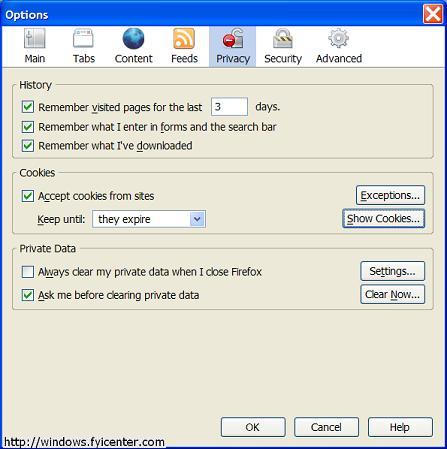
[b][lime]FireFox -[/lime][/b] from the main menu bar select Tools>Internet Options>Privacy. The go the "Private Data" section, select "settings" and make sure "cache" is selected. You can then click the "Clear Now" button to clean the cache. In newer version there is a short cut key so you can clear your cache without having to navigate through the menu options.
Is there an Easier Way to Clear the Cache? [/b][/red]

The cache is not the only set of files that your computer collects which can cause serious privacy issues. Your browser for example stores a history of the URLs you visit. The Windows operating system also stores a list of files you recently accessed including media files like videos which you download.

Thankfully there are a number of good software products which help you clear out all of these files. This a critical part of protecting your privacy and helps boost your computer's performance.
Try a free scan and see what potential privacy risks are lurking on your computer

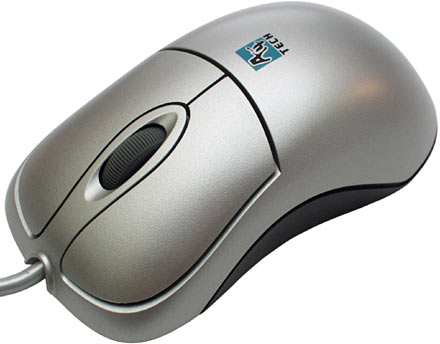
Powering on the Computer With Your Mouse


If you have ATX Main Board, ATX case Award Bios, or any Bios that supports PS/2 Mouse Power On, then you can power on your computer with a double click.

To activate this feature:

1-Restart your computer
2-Then press Del when the BIOS message appears to enter your CMOS configuration
3-Select Integrated Peripherals from main menu
4-If PS/2 mouse power on disabled, activate it by press page up/ page down key it will became Double-Click
5-Press Esc key to exit
6-Press F10 to save and exit Power off your PC
7-Now double-click the left mouse button,.. Your PC will turn on

Windows Vista


It has been confirmed that Microsoft's next generation operating system "Windows Vista" will be available in stores from January 2007. Microsoft has been working hard past few years for this release and I believe this version of Windows is worth buying.

Windows Vista Editions[/red]
Unlike Windows XP, Vista comes in 6 different versions and each of them is different in its features and price. Obviously you will be at confusion while choosing from the different versions.

[blue]1]
Windows Vista Starter Edition
[/blue]
This version is the stripped down version of the basic home edition. This means it has the lowest feature set and security. It is more like a demo for all other editions of Vista. This version is only available in emerging regions like India, Russia, Mexico, Indonesia & Thailand.

[blue]2]
Windows Vista Home Basic Edition
[/blue]
This is more like Windows XP Home Edition. Just the enough features for casual Internet browsing and entertainment. This edition does not have the important features like Aero UI & Windows media technologies.

[blue]3]
Windoes Vista Home Premium Edition
[/blue]
This is more similar to Windows XP media centre edition. It has all the important features required for normal Home entertainment PC. This edition comes with Aero UI, Scheduled back up feature & premium games. Thus if you are addicted to XP media center edition, this is the vista equivalent for you.

4]
[blue]Vista Business Edition[/blue]
Business Edition of Windows Vista is equivalent to XP Professional Edition. It has all the features of Home Premium Edition except parental control and has some additional feature for faxing & scanning. This also has shadow copy - system back up & recovery service to keep your data safe. If you are a XP Pro fan like me, this is the right version to look forward.

[blue]5]
Vista Enterprise Edition
[/blue]
From the name itself, it should be clear that it is for big enterprises where data protection is important. The major difference between Vista Business and Enterprise is the added data encryption & security features. You only need to buy this version if you are running a business and need more security for your data.

[blue]6]
Vista Ultimate Edition
[/blue]
If you have all the designed features of Windows vista in one package, you call it Windows Vista Ultimate. It has all the features of Home Premium and Business Enterprise Editions. Unfortunately, I'm yet to learn the prospects of this edition.

Thus if you are an avid gamer, movie enthusiast or an audiophile, Home Premium is the best choice. If you just need a PC for emailing and document processing, Vista Home Basic is your edition. For small businesses, I would recommend Vista Business Edition.

Windows Vista System Requirements[/b]
[red]Home Basic Windows Vista[/red]

* 1 GHz 32-bit (x86) or 64-bit (x64) processor
* 512 MB of system memory
* 20 GB hard drive with at least 15 GB of available space
* Support for DirectX 9 graphics and 32 MB of graphics memory
* DVD-ROM drive
* Audio Output
* Internet access (fees may apply)

Additional Requirements

Actual requirements and product functionality may vary based on your system configuration. Windows Vista Upgrade Advisor can help you determine which features and edition of Windows Vista will run on your computer.

While all editions of Windows Vista can support multiple core CPUs, only Windows Vista Business, Ultimate, and Enterprise can support dual processors.

[red]Home Premium / Business / Ultimate Windows Vista[/red]

* 1 GHz 32-bit (x86) or 64-bit (x64) processor
* 1 GB of system memory
* 40 GB hard drive with at least 15 GB of available space
* Support for DirectX 9 graphics with:
o WDDM Driver
o 128 MB of graphics memory (minimum)
o Pixel Shader 2.0 in hardware
o 32 bits per pixel
* DVD-ROM drive
* Audio Output
* Internet access (fees may apply)

Additional Requirements

Actual requirements and product functionality may vary based on your system configuration. Windows Vista Upgrade Advisor can help you determine which features and edition of Windows Vista will run on your computer.

While all editions of Windows Vista can support multiple core CPUs, only Windows Vista Business, Ultimate, and Enterprise can support dual processors.
Home Premium / Ultimate

What is "Google"?


Definition: Googol

Pronunciation: 'gü-"gol
Function: noun

Google is a play on the word googol, which was coined by Milton Sirotta, nephew of American mathematician Edward Kasner, and was popularized in the book, "Mathematics and the Imagination" by Kasner and James Newman. It refers to the number represented by the numeral 1 followed by 100 zeros. Google's use of the term reflects the company's mission to organize the immense, seemingly infinite amount of information available on the web.

Originally called "Backrub", the logic behind the Google search engine was develop by graduate students Larry Page and Sergey Brin at Stanford University in 1995. Their first place of business was literally a garage. The garage location was chosen because it had a washer/dryer and a hot tub out back, they were already serving 10,000 searches a day.

try this link--
http://www.google.com/corporate/history.html

So How Does Google Work?[/red]
* Crawls and indexes web pages et al.
* Stores copies of web pages and graphics on their caching servers
* Presents users with simple front end to query the database of cached pages
* Returns search results in a ordered fashion based upon relevancy

[red]Anatomy of a Search [/red]
http://computer.howstuffworks.com/search-engine1.htm
1]
Server Side

2]
Client Side

[red]What Can Google Search? [/red]
* Adobe Portable Document Format (pdf)
* Adobe PostScript (ps)
* Lotus 1-2-3 (wk1, wk2, wk3, wk4, wk5, wki, wks, wku)
* Lotus WordPro (lwp)
* MacWrite (mw)
* Microsoft Excel (xls)
* Microsoft PowerPoint (ppt)
* Microsoft Word (doc)
* Microsoft Works (wks, wps, wdb)
* Microsoft Write (wri)
* Rich Text Format (rtf)
* Shockwave Flash (swf)
* Text (ans, txt)

So What Determines Page Relevance and Rating? [/red]
* Exact Phrase: are your keywords found as an exact phrase in any pages?
* Adjacency: how close are your keywords to each other?
* Weighting: how many times do the keywords appear in the page?
* PageRank/Links: How many links point to the page? How many links are actually in the page?

Equation: (Exact Phrase Hit)+(AdjacencyFactor)+(Weight) * (PageRank/Links)

[red] How Do I Get Results? [/red]
* Pick your keywords carefully & be specific
* Do NOT exceed 10 keywords
* Use Boolean modifiers
* Use advanced operators
* Google ignores some words:

a, about, an, and, are, as, at, be, by, from, how, i, in, is, it, of,

on, or, that, the, this, to, we, what, when, where, which, with

[red]Google's Boolean Modifiers [/red]
* AND is always implied.
* OR: Escobar (Narcotics OR Cocaine)
* "-" = NOT: Escobar -Pablo
* "+" = MUST: Escobar +Roberto
* Use quotes for exact phrase matching: "nobody puts baby in a corner"

OR

"there are known knowns; there are things we know we know. We also know there are known unknowns; that is to say we know there are some things we do not know. But there are also unknown unknowns, the ones we don't know we don't know."

HOW PC GAMES ARE MADE

  PC gaming has been a popular hobby for decades, and with the rise of digital distribution platforms like Steam and GOG, it's easier th...