Showing posts with label MUST. Show all posts

Monday, February 13, 2023

WhatsApp Tips and Tricks 2023


Who Don't Know about Whatsapp Today...Its most Downlaodable app on Google pay Store and IOS.

It is a hugely popular mobile messaging app that’s favored by two billion monthly active users. Fans love that WhatsApp lets them chat, call and video call for free, as well as send each other photos and videos. However, WhatsApp is so rich in features that you might feel overwhelmed at first.


That’s when these WhatsApp tips might come in handy.


Key Takeaways:

1. WhatsApp has become a big part of our lives. If you use it, it’s important to get acquainted with the little tricks that help you get everything out of the app.

2. WhatsApp is especially useful as a messaging platform for groups where multiple people have smartphones. They can use WhatsApp to communicate without racking up SMS charges.

3. You can call any WhatsApp user for free by saving their contact number. It supports both audio and video calls for this purpose.

From ways to make chatting easier to advice for better securing your WhatsApp account, here are latest year 2023 tips and tricks you can use right now.


What Are the Hidden Features of WhatsApp?

Lesser known WhatsApp features include the ability to format your texts with italics, bold and strikethrough; pinning your favourite chats; sending temporary messages and turning off blue ticks for more privacy

How Can I Make My WhatsApp More Attractive?

You can customize your WhatsApp to be more aesthetically pleasing by changing the wallpaper, altering text size and choosing between light and dark theme for the interface.


How Do I Style Text on WhatsApp?

Select the text you wish to style and choose between the options that appear. You can choose between bold, italic, strike-through and monospace.


How Can You Tell if Someone Has Read Your WhatsApp Without Blue Ticks?

WhatsApp does not turn off blue ticks for voice messages. You can send the recipient a voice rec and see if they view it. This can tell you whether or not they’ve opened your messages.


1. Send Disappearing Messages

Disappearing messages automatically delete themselves after a certain period of time. That way, you won’t have to worry about your message being saved or forwarded without your knowledge.

WhatsApp gives you the option of having messages disappear after 24 hours, 7 days or 90 days. You can turn it on for specific conversations with anyone you choose. Keep in mind though that the preview of the message will remain viewable in the notifications panel until you open the app, even if the time lapses for the message period.

To turn on disappearing messages, follow these steps:

Open the WhatsApp chat you want to use disappearing messages on.

Click on the contact’s name.

Click on “disappearing messages.”

Select your preferred duration.

Alternatively, if you want to enable disappearing messages for all your contacts, you can do this:

Open Settings.

Tap Account, then go to Privacy.

Select Default message timer and then select your preferred duration.

Once enabled, WhatsApp will notify you directly in the chat that the disappearing messages are turned on.


2. Audio or Video Call Your Friends

One of WhatsApp’s most popular features is the free audio and video calls it offers its users. You can call your friends one-on-one or even have group calls of up to 32 participants on WhatsApp.

To do this, open the contact or group you wish to call. In the top-right corner of the action bar, you will see a video call button and an audio call button. Choose which you prefer.

video-vs-audio-call

With a video call, as shown on the left of the picture above, your camera will be on by default and you won’t be able to turn it off. However, you do have the option to reverse the camera should you wish to. With audio calls, the standard WhatsApp wallpaper will be displayed.

You can toggle your mic on and off with both.


3. Customize Your Chat Wallpaper

Are you looking to add a prettier aesthetic to your WhatsApp chats? You can change the wallpaper for all your chats, or set specific wallpapers for chats with different people.

You can also choose between dark or light mode wallpapers. On dark mode, you have the option to dim your wallpaper too, so it’s easier on the eyes.

To change the wallpaper across all chats, follow these steps:

Tap the three vertical dots that indicate more options and click on “settings.”

Then click on “chats” and then “wallpaper.”

Here, you can alter the wallpaper dimming level to your preference.

To change the wallpaper altogether, click “change.”

You can choose from WhatsApp’s templates of bright, dark or solid colors or choose one from your photos. You can also opt for WhatsApp’s default wallpaper.

Click “set wallpaper.”

chat wallpaper

If you want to change the wallpaper for a specific chat, these are the instructions:

Open the chat you want to customize the wallpaper for.

Tap the three vertical dots that indicate more options and then click on” wallpaper.”

Alter the wallpaper dimming level to your preference.

Click “change” to update the wallpaper picture and choose from WhatsApp’s categories or your own image.

Tap “set wallpaper.”


4. Change Your Privacy Settings

When you first install the app, WhatsApp’s default settings allow any user to see when you were last online, your about information and profile picture and whether you have read receipts enabled. Only your contacts will be able to see your status updates, but anyone can add you to groups.

To change these privacy options, go to your settings page. This may vary depending on device.

On Android, tap the three vertical dots that indicate more options. Then click on “settings,” then “account,” then “privacy.”

On iPhone, you can directly tap “settings,” “account,” then “privacy.”

On desktop devices, you have to tap the menu symbol, “settings,” then “privacy.”

privacy

From this menu, you can directly update:

Your “last seen,” which displays when you were last on the app

Your profile photo

Your “about” information

Your status

Disappearing messages default timer

Who can add you to groups

Your live location sharing

You can also manage your blocked contacts, enable fingerprint lock, and enable or disable read receipts.

Keep in mind that:

You won’t be able to view others’ “last seen” unless yours is enabled.

You can’t view read receipts for messages you send if either you or the other party has read receipts turned off.

The status of ‘online’ and ‘typing’ is always visible and cannot be changed.


5. Keep Track of Your Data and Storage Usage

Keeping track of how much data you’re consuming can be useful, especially if you’re using WhatsApp as part of a limited mobile data plan.

You may also find your phone filling up and want to reduce the amount of storage WhatsApp takes up. The WhatsApp data report can show you how much data the app is consuming at a glance.

network usage report

All you have to do is go to settings and click “storage and data.” From here, you’ll have the option to:


Manage storage

View your network usage

Toggle the “use less data for calls” option on and off

Change your media auto-download settings

Choose media upload quality

If you click on the “network usage” option, you can view a detailed breakdown of your data usage.


6. Delete Your WhatsApp Media

 If you want to delete WhatsApp media without deleting the entire app, you can directly go to your phone’s file manager or gallery.

From there, locate your WhatsApp images and WhatsApp video folder and clear out the files you don’t need. For example, on a OnePlus phone, you would see this listed under the app collections in your gallery.

whatsapp gallery


7. Turn Off Automatic Media Download

WhatsApp automatically downloads pictures and clips from your chats.

If you open your photo gallery and find it filled with videos and images from WhatsApp that take up a lot of space, manually deleting each one can be a time-consuming chore. A simple hack is to turn off media auto-download and keep WhatsApp media from your gallery altogether.

To do this, navigate to settings and then storage and data. Under the media auto-download section, you’ll be able to change the settings for three modes:

When using mobile data

When connected on WiFi

When roaming

storage-and-data

For all three, you can specify which content you want to download automatically. You can choose to enable this for photos, audio files, videos and documents.


8. Bookmark Messages With the Star Icon

If you’re navigating several conversations, you might find yourself easily lost in the sea of text. Thankfully, WhatsApp has a useful feature for starring messages you want to reference or come back to later.

starred messages

Here are the steps to take:

Navigate to the conversation and find the particular message you want to bookmark.

Tap and hold the specific message box and then select any other messages you want to star as well by simply tapping on them.

From the action bar on the top, select the star icon.

You can view your starred messages with a contact anytime by clicking on their contact name and then selecting starred messages.

view starred messages

From here, you can navigate through the whole archive, or use the search bar feature to find the message you want. If you wish to unstar a message, hover over the message, click on the Menu bar and then Unstar message.


9. Delete Messages for Everyone (or Just Yourself)

Whether you’re looking to get over some painful memories or simply cleaning up a long line of extensive chats, you can delete all the texts or media you’ve exchanged with someone on your contact list.

There are two approaches to this. You can delete messages for everyone involved in the chat, or delete it just for yourself. For the former, you must delete the message within an hour of sending it. To do this:

Select the message you want to delete.

Click on “options,” then “delete” and “delete for everyone.”

delete messages

You can delete records of your own chats on your phone at any time. This won’t impact the recipient’s chat history. To do this, open the chat in question and: 

Select the message you want to delete.

Click on “options,” then “delete” and “delete for me.”


If you don’t want to manually select and clear a whole conversation, you can directly select the contact’s name from your recent chats list, then click the trash icon on the action bar.


10. Search Your Chat History

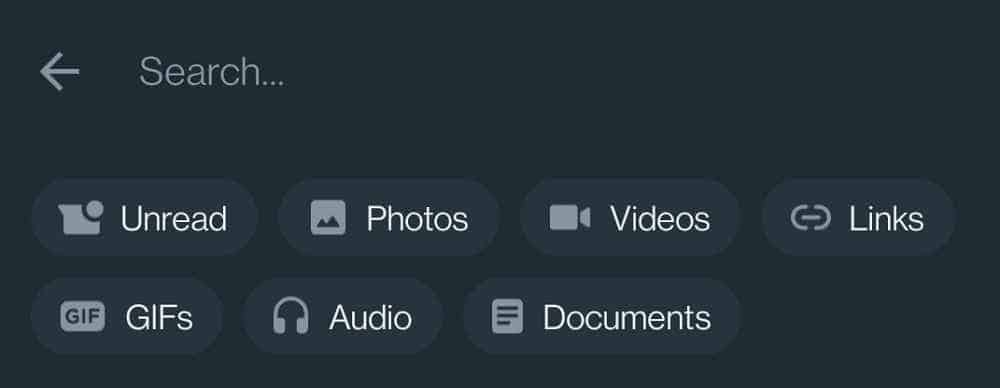
If you’re ever looking for a specific message from a chat but can’t remember which one and you don’t have it starred, the WhatsApp search feature should be your go-to tool. As long as you can remember a few words from your conversation, it should be relatively easy to find.

You can also find media and documents with this feature.


search-chat-history

To search your chat history using a keyword, follow these steps:

Open WhatsApp.

While on the chats screen, click on the search icon.

Insert the keyword(s) you’re looking for.

Tap on the relevant results that show up.

If you want to search for media linked to the keyword, you just have to click on the relevant filter for that. This will streamline the results.


11. Search One Chat in Particular

There’s a faster way to find a message if you already know which chat to look in.

search one chat

To do this, follow these instructions:

Open the specific chat.

Tap the three vertical dots that indicate more options and click on “search.”

Enter the relevant keyword.

Use the navigation arrows to go through each result individually.


12. Send Messages Through Google Assistant

If you have Google Assistant set up on your Android phone, you can use it to send messages directly on WhatsApp. You don’t even have to open the app yourself — the voice assistant can do it all for you.

google assistant

To activate Google Assistant for WhatsApp, do the following:

Open Google Assistant or say “Hey Google.”

Then say, “Send a message to [contact name].”

Choose WhatsApp from the displayed apps.

Narrate the message you want to send.

Google Assistant will repeat the message back to you. If it’s accurate, say “yes” and the message will be sent.


13. Back Up WhatsApp to a Cloud Storage Service

Having backups of all your messages is always a good idea, especially if you’re having important conversations or value the emotional weight of online chats. WhatsApp can back up both chats and media files to your preferred cloud storage device.

whatsapp backup

iOS users can backup their chats to iCloud. Android users have the option to back up to Google Drive. The steps are pretty much the same on both platforms.

Go to settings.

Go to chat, then chat backup.

Ensure your Google Drive account or iCloud account is linked.

Enable auto backup and choose the backup frequency.

whatsapp backup frequency

Alternatively, you can do manual backups at any time on both platforms by going to settings, then the chats menu, chat backup and finally back up now.


14. Turn Off Read Receipts

Read receipts inform you, and the other recipient, when a message has been seen. One gray tick indicates the message has been sent but not received on the recipient’s device. Two gray ticks means it’s been delivered but not seen yet. Two blue ticks mean the message has been read.

If you want more privacy, you can turn off read receipts so that your contacts don’t know when you read their messages. If you do this, even the messages you read will appear as unread messages and will stay on two gray ticks (but be aware that this works both ways). However, keep in mind this only works with individual chats and does not apply to group chats or play receipts for voice messages.

Here’s how to turn off read receipts:

Go to settings.

Click on “account,” then “privacy.”

From here, toggle read receipts on or off.

read receipts

Be wary of using third-party apps for this. There are several available that market themselves with this function, such as Unseen and Private Read, but you can’t be too sure of your privacy with these apps.


FINAL :

WhatsApp App is one of the world’s favorite messaging apps. The app’s popularity is easy to understand — it’s convenient, secure and free. But many people don’t know that it can do much more than just send text messages. Hopefully, this article will help you explore other dimensions of WhatsApp.

How often do you use WhatsApp? What are your favorite WhatsApp tricks from this list, or are there any that we missed out on? Let us know in the comments.


Thank You.. :)

Sunday, February 12, 2023

All about ChatGPT


-What is AI chatbot?. 

A chatbot is a computer program that simulates human conversation through voice commands or text chats.


How do AI chatbots work?: 

AI chatbots work by mapping out a user's conversation flow and responding accordingly. In order for a chatbot to understand a user's intentions, it must first be trained on a large data set of conversation data. Once a chatbot has been trained, it can then be deployed to a live environment where it can interact with real users.


-What are the benefits of using AI chatbot?.

Some benefits of using AI chatbots are that they can help reduce customer support costs, improve customer satisfaction, and increase sales.


How AI chatbot affects our daily life?.

There are a few ways in which AI chatbots can affect our daily life. The most obvious one is through the way they can communicate with us. AI chatbots are able to understand and respond to our questions in a way that feels very natural. This can make things like customer service a lot more efficient. Additionally, AI chatbots can help us to automate tasks that we would otherwise have to do manually. For example, they can help us to book appointments or tickets.


What are the benefits of using AI Chatbot?

Using AI chatbot can provide many benefits to businesses. Implementing these can result in improved customer satisfaction. Chatbots are as effective as experienced employees and are about 4x times more effective than inexperienced employees in selling products. Companies can save costs by implementing chatbots with AI capabilities. These bots can also provide detailed insights about the customers who can be used to improve products and services.

The future of AI chatbot.

AI chatbots are becoming increasingly popular and their popularity is only going to continue to grow. Their abilities to understand and respond to human conversation is getting better every day and they are only going to become more realistic and lifelike. It is exciting to think about all of the possibilities that AI chatbots could bring in the future and how they could revolutionize the way we interact with technology.


List Of Most Popular AI Chatbots

1. Tidio

2. ProProfs ChatBot

3. Freshchat

4. Landbot

5. Salesforce

6. Podium

7. Mitsuku – Pandorabot

8. Botsify

9. MobileMonkey

10. Imperson

11. Bold360

12. Meya AI

13. Aivo

14. ManyChat

15. ItsAlive

16. FlowXO

17. Chatfuel

18. HubSpot Live Chat


and the list will go on...

Thank you and please subscribe and support my channel... :)

Thursday, February 9, 2023

SMARTPHONE BYUING GUIDANCE


Wanted to buy a smartphone in this new year 2023? Well, it looks like an easy task on the surface but it gets more complicated when you start to research. Unlike a few years ago, smartphones now offer a plethora of features and you simply cannot close your eyes and go for one option without doing proper research. Every manufacturer now offers different camera lenses on every new model, and the processors are getting more and more powerful as well. In this article, we will guide you on how you can buy a smartphone that is the right fit for you.

Purpose/ Requirements :


What do you want the smartphone for? Is it photography, So that you can capture those beautiful travelling moments or birthday parties? Or is it gaming, so that you can crush those opponents in the forthcoming Call of Duty or Apex Legends match?

You need to be clear in determining what exactly you want your phone to do. And almost no phone is perfect. If one has an excellent camera setup, the other will be having a flagship processor, with a great cooling solution. So you have to be ready to sacrifice some parts of the phone which might have the lowest priority for you.

Some requirements for which you might want to buy a smartphone :


1. Cameras – If the camera is the highest priority, look for cameras that have multiple lenses so that you get a different perspective with each lens. Most commonly, an ultra-wide angle lens, a telephoto lens and/or a macro lens will be accompanied by a primary lens. Also, make sure the phones process the photos well using AI algorithms. This differs from brand to brand. For example, the Pixel phones shoot contrast-heavy photos that appear pleasing to the eye, whereas the Nothing phone shoots close to Natural photos, so they look at the subject as it is when you shot it.


2. Performance – Now if you want the best performance out of a smartphone, then look for the SoC (System on Chip). Typically, flagship processors such as the Snapdragon 870 and above, or MediaTek Dimensity 8100 and above give you fantastic performance for the money. You can play games at the highest settings with frame rates as high as 90fps.


3. Software – If you are buying a phone for your parents or grandparents, then it is better to buy a smartphone that has a simple user interface, and doesn’t have a lot of bloatware. Many times, our parents might tap on an unexpected notification, and the ad ends up installing a dozen apps. Stock Android smartphones or an iPhone may be the best bet here.

4. Battery life and charging speed – Now if you want a phone to last longer, there are two sides to this, either you can have a small battery with a ridiculous fast charger, which can top up your phone in 15 minutes, or you can have a big battery, with a slower charging speed. This will make the phone last longer, and the batteries won’t die out prematurely due to the daily use of fast charging. These days, phones also come with battery protection features built-in, so do check for that before pulling the trigger.


Specifications :

Now that we have a clear idea of what to pick for our smartphone, let’s dive into the specifications. On paper, specifications might look a bit exciting, but usually, on-paper specifications don’t translate to real-life usage. So, always check for reviews before buying a smartphone. This tells us the previous experience of the person who has actually used the smartphone, so you have a clear idea of what to expect, the pros, and the cons.

The specification sheet will give you a basic idea of the smartphone, and extra benefits such as IP67 rating for water resistance, wireless charging, stereo speakers, Gorilla Glass protection, etc. which are usually mentioned. This will help you make an informed decision, and will also help you compare two products side by side if you are confused.

Payment Options :

Nowadays, EMI offers are available everywhere. And what’s more, you even get extra cashback on smartphones using EMIs. While it is a convenient way of stretching your budget, we would not recommend it as it leads to a feeling of living paycheck to paycheck. We would suggest you use apps like Hubble, which helps you map out your financial plan, and save and when it is time to purchase, you get brand gift cards that help make your purchase even easier. Moreover, they incentivise your savings with additional 10% cash returns, which makes them better than other cashback out there.

Here’s how the app works:
● Let’s say you want to buy an iPhone, all you have to do is open the Hubble app, and click on the Apple/Croma category that appears on the homepage.
● Now, you will see two banners, Savings Plans with 10% rewards, and Instant Plans with 4% rewards, click on the Savings Plans banner
● Now you will see that with every deposit, you will earn 10 percent cash rewards in 30 days, here’s a screenshot of how it is calculated.


● You can customize the plan as per your liking, with the monthly deposit and tenure set according to your needs. The cash rewards will be added to your account 1 month after every deposit and when the tenure ends, you can generate gift cards for the purchase.
● These gift cards can be redeemed offline or from the brand’s own website.
● In case you want to stop the plan midway, you can do that too, and the rewards earned up to that period can be used to make purchases.
● Moreover, you can use this amount to purchase, anything from the brand, not just what you saved for.
● Also, in case you change your mind to purchase, you can withdraw the deposited amount from your Hubble account without any charges

Budget:


Now that you’ve saved enough and are ready to buy your dream phone, let’s talk about the budget. Smartphones come in a wide range of prices, starting from as low as Rs 7,000 to as high as over Rs 1,00,000. So, in order to avoid confusion, we’ve divided the smartphones into different price segments, and what you should expect from each price segment.

Budget (Rs 7000 – Rs 12,000) – In this segment, you will get the basics of a smartphone, such as a good 32GB internal storage, up to 4GB of RAM and a full-HD display. The SoC is decent enough to do normal tasks like web browsing, clicking occasional photos etc.

Mid-range (Rs 13,000- Rs 25,000)- This is the most popular segment in India, here you get a few additional quirks such as an AMOLED display, fast charging, stereo speakers and a powerful SoC. The camera is also decent, and on the upper end, it is good enough to give you social media-ready shots. You may also get some extras such as an infrared scanner and a big battery.

Upper midrange (Rs 26,000- Rs 45,000) – This is also a popular range, where you get better build quality, good haptics and an overall decent experience. The cameras get better too. On the upper end of this price range, the photos from the ultrawide camera are excellent to share on social media. You may also get some niche features such as triple microphones for voice clarity, water and dust resistance, and a bright, vivid display with a 10-bit colour gamut and HDR10+ support.

Premium (Rs 46,000 – Rs 55,000) – In this segment, you will start to get almost all the features that a smartphone is touted to have. From an IP68 rating for water resistance to wireless charging and a metal frame, you get a very different experience compared to smartphones in the previous segment. Not only that, the SoCs are top-of-the-line, such as Snapdragon 8+ Gen1, and you get video recording options up to 4K at 60 fps. You also get a third camera, which is a telephoto lens, that helps you with far-away shots. Other than that, it is a standard affair for all Candybar smartphones.

Ultra premium (Rs 56,000 and above) – This is the top-end segment, where you will find smartphones pushing the limits of what the small form factor can fit in. Be it foldable displays, 50W superfast wireless charging, or RGB-coloured back panels, you get to experience what no other smartphone offers below this price segment. You also get longer software support, as people may keep their smartphones for a longer time with them.

After-sales service

Now, people buy smartphones thinking that their units may not have any defects. That is usually the case, but you may never know when you have a bad day. You might get a defective unit, break your screen while riding or get water damage. This is where after-sales service comes into the picture. Not only the experience of the smartphone repair is important, but the price of the spare parts also plays an important role. Do check and get an idea of the pricing of spare parts from various brands and make your decision accordingly.

Warranty:


Here is the final piece of the puzzle which you have to take into consideration when buying a smartphone. Usually, most smartphones have 1 year of limited warranty. In this, manufacturing defects are taken care of and labour charges are waived off from the company itself. Recently, brands like POCO have started to sell phones with 2 years of warranty, which gives you an additional piece of mind. E-commerce platforms like Amazon and Flipkart also give you options like extended warranty and damage protection, so if you are buying a very expensive phone, we would suggest you to consider having a look at this too before finalizing your purchase. And that’s it from our end. We hope you have gotten a good idea of what factors you should consider when buying a smartphone.

Thank You .... :)


Wednesday, February 8, 2023

What are the Top Searched Websites/App nowadays on the internet?

These days, people are searching for a lot of different things on the internet. Some of the most popular searches include news stories, health information, entertainment content, and shopping.

More popular searches include gaming and streaming content, educational resources, job postings, sports information, and travel deals. People are also increasingly turning to the internet for advice and guidance on finances and investments. More popular searches include gaming and streaming content, educational resources, job postings, sports information, and travel deals. People are also increasingly turning to the internet for advice and guidance on finances and investments.

1. Social Media


Social media is a form of communication that involves the sharing of content and information via electronic platforms such as websites, blogs, forums, and applications. Social media allows users to interact with each other, share ideas and opinions, and stay up-to-date on news and events. It has become an essential tool for businesses to extend their reach and connect with customers.

Examples of social media include Facebook, Twitter, Instagram, LinkedIn, Snapchat, Pinterest, YouTube, WhatsApp, Tumblr, and Reddit.

2. Youtube


Youtube is an online video sharing platform that allows users to upload, view, and share videos. It is currently the second-most visited website in the world after Google, with over 2 billion monthly active users. Youtube has become an important tool for businesses and individuals to share their stories, market products, and collaborate with others. It is an engaging and entertaining platform that allows people to create, share and discover content from all over the world. It's an important part of our current culture, providing a creative outlet for users to express themselves and connect with others.

3. Pornhub


Pornhub is an adult entertainment website that offers a variety of video and image content, including streaming videos and user-generated content. It is one of the worlds most popular porn sites, with millions of daily visitors. Pornhub offers an array of explicit content that is not suitable for people who are under the legal age for viewing such material.

4. Amazon


Amazon sells a wide variety of items such as books, electronics, apparel, home and garden supplies, toys, pet supplies, and much more. They also offer Amazon Prime, which is an annual membership with access to free one-day delivery, streaming video and audio, access to Prime Music, and other benefits. It also offers Amazon Web Services, which is a cloud computing platform that provides businesses with access to web hosting, databases, and other services. They also provide a variety of digital media streaming options, as well as Amazon Marketplace, which allows third-party sellers to advertise and sell their products.


5. Instagram


Instagram is a free photo and video sharing app developed by Facebook. It allows users to share photos, videos, stories, and messages with their followers, as well as explore content from other users. Instagram also offers several features such as live streaming, hashtag searches, location tags, and much more. It provides a platform for people to express themselves, promote their businesses, and build relationships with others.

6. WhatsApp


Whatsapp is a multi-platform messaging app used for instant messaging, voice and video calling, group chat and media sharing. It is available for Android, iOS, Windows Phone and other smartphones. Whatsapp is a great tool for businesses as it enables companies to communicate with customers quickly and easily. It can be used for customer support, providing information about new products and offers, running promotions, and more. Additionally, Whatsapp provides end-to-end encryption for all messages, ensuring that conversations remain private and secure.


7. Twitter


Twitter is a social networking and microblogging platform which allows users to post and interact with messages known as "tweets". It is widely used for connecting with friends, sharing news and information, and building a network of contacts. Twitter became popular as it provided an easy way to connect with people around the world and to share information quickly and easily. It offered a platform to voice opinions, share updates, and engage with others in real time. Additionally, its use of hashtags and trends made it easier for people to discover topics of interest, creating a more engaging online experience.

8. NetFlix


Netflix is a streaming service that provides both television and movie content over the Internet. It offers a wide range of movies and TV shows, ranging from comedy, drama, documentaries, and more. Netflix also provides exclusive original programming such as Stranger Things, Narcos and The Crown. With an ever-growing library of content, Netflix offers something for everyone to enjoy.

And there is much more .....


Thank You... :)

HOW PC GAMES ARE MADE

  PC gaming has been a popular hobby for decades, and with the rise of digital distribution platforms like Steam and GOG, it's easier th...